
Subscribe to get access
Read more of this content when you subscribe today.
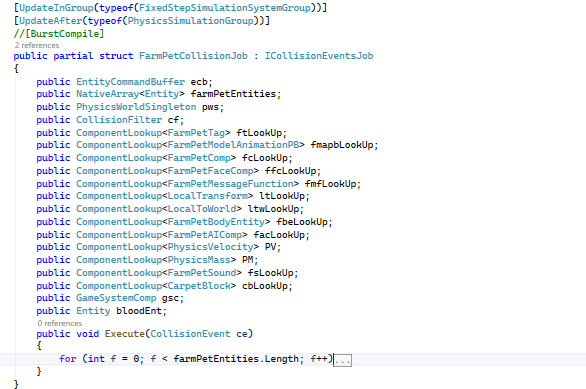
Some features of the Unity physics system involve transitioning from script-based events to a job system that inherits from structs. When using components, you can look up collider events linked to the entity to manage how collisions are handled in the job system. By utilizing the collision event parameters, you can access various functions related to those parameters in your script. It is essential to access these events to perform the desired functions.
As you know, job entities can be used with the native array that stores variables temporarily in memory. These variables are utilized and disposed of within a single frame after being employed in the job system, such as the farm pet collision job. Implementing this in the job system enhances performance. It also organizes your code into a cohesive block that operates based on component look-ups. Further testing is required for me to ascertain whether performance has improved. This is particularly true when compared to the farm pet job remaining static. However, I can initially say that there has been a noticeable performance increase. This improvement is especially evident during tests in the editor where frame rates are easily observable. More recent development is necessary to enhance and assess the overall performance of the farm pet in the game.
 DuRound Sanctum Studio
Leave a comment